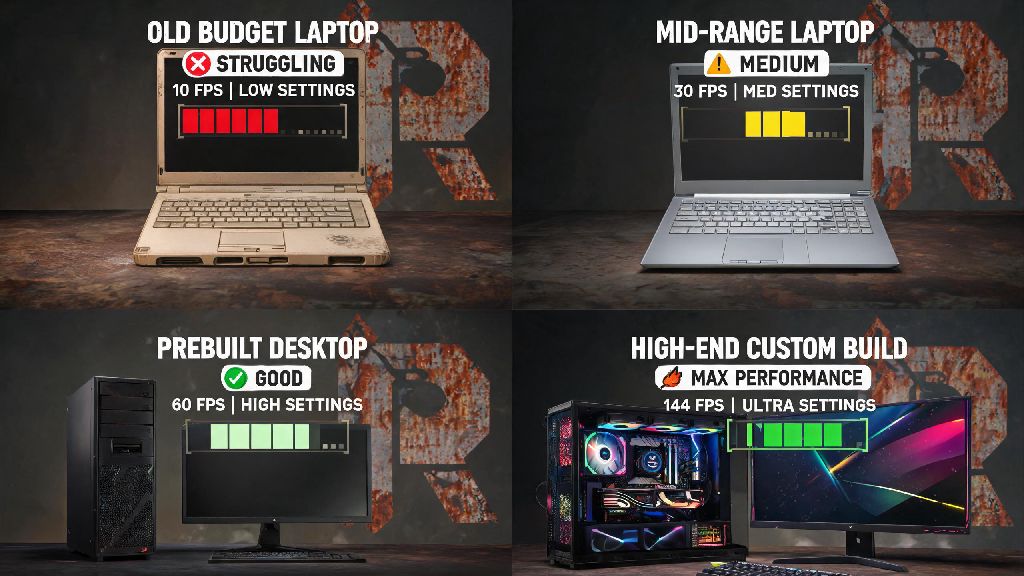
If you’ve seen clips of Rust’s chaotic open-world PvP, base building, and survival challenges, you’ve probably wondered do you need a good pc to play rust before you drop money on the game or a hardware upgrade. Lots of new players get intimidated by rumors that Rust only runs on high-end gaming rigs, but that’s not always the case. I’ve played Rust on everything from a 7-year-old budget laptop to a top-tier custom build, so I’m breaking down exactly what you need to run the game smoothly, no unnecessary upgrades required.
Do You Need a Good PC to Play Rust? Breaking Down Official Requirements
Facepunch, the developer of Rust, publishes official minimum and recommended system requirements on its store pages, but these numbers are often a lot more forgiving than players expect. The official minimum specs list an Intel Core i5-2500K or AMD equivalent, 10GB of RAM, a GTX 670 2GB or equivalent GPU, and 25GB of available storage. But if you try to run Rust on these specs, you’ll be lucky to hit 30 FPS on 720p lowest settings, and you’ll likely deal with constant stuttering when you approach crowded areas like the Outpost or Large Oil Rig. The official minimum requirements will only let you launch the game, not enjoy it.
The recommended specs, on the other hand, list an Intel Core i7-4790K or AMD equivalent, 16GB of RAM, a GTX 980 4GB or equivalent GPU, and SSD storage. These specs will get you around 60 FPS on 1080p medium settings, which is enough for casual play. But these specs are from 2021, so newer mid-tier hardware released in the last three years will easily outperform these numbers for a lower cost.
What PC Specs Actually Deliver a Smooth Rust Experience?
The real answer to what you need depends almost entirely on your playstyle, not just the official specs. If you only play on small, private servers with 10 or 20 of your friends, build small bases, and stick to less crowded areas of the map, you can get away with much lower specs than someone who plays on 100-player public servers and raids multiple times a week.
16GB of RAM is non-negotiable for consistent performance, no matter what your playstyle is. Rust loads hundreds of open world assets, player builds, and environmental details as you move across the map, so if you only have 8GB of RAM, the game will constantly be swapping assets in and out of memory, leading to freezes and crashes even if your CPU and GPU are high-end. Storage type matters more than you think, too. Running Rust on a traditional HDD will lead to 2 to 3 minute load times when joining servers, and constant texture pop-in as you move around the map. Switching to even a basic SATA SSD cuts load times to 30 seconds or less, and eliminates almost all texture pop-in, even if your other specs are lower.
For GPU, you don't need a top-of-the-line RTX 4090 to get good performance. A mid-tier GPU like an RTX 3060 or RX 6600 will easily run Rust at 100+ FPS on 1080p high settings, which is more than enough for most players. CPU is also important for handling large server performance, especially when you’re near lots of other players or large, complex bases. A 6-core CPU released in the last 5 years will handle almost all Rust playstyles without issues.
How to Play Rust on a Lower-End PC Without Upgrades
If your PC is below the recommended specs, you don’t have to drop hundreds of dollars on upgrades to play Rust. There are dozens of in-game and system tweaks you can use to boost FPS significantly, without ruining your ability to play and compete. I used these same tweaks when I played on my old 2017 laptop with a GTX 1050, and I was able to get a consistent 45 FPS on 1080p low settings, which was enough to hold my own in PvP fights and base raids. Some of the most effective tweaks include:
You can also turn down your view distance to 3000 or 4000, instead of the default 5000. Most players won’t notice a difference in visibility, and it cuts down on the number of assets your GPU has to render at any given time. You don't have to run Rust on max settings to have fun or compete in PvP fights. Most top competitive players run the game on medium or low settings specifically to get higher FPS and better visibility, so you won’t be at a disadvantage if you lower your settings to get better performance.
When It Makes Sense to Upgrade Your PC for Rust
There are some cases where tweaking settings won’t be enough to get playable performance, and upgrading your hardware is worth the investment. If you’re constantly getting under 30 FPS even on the lowest possible settings, or if the game crashes every time you try to join a large server, it’s probably time to look at upgrades. If you want to stream or record your Rust gameplay, you’ll also need better hardware to handle both the game and the recording software at the same time, without dropping frames.
You don't need to spend $1000+ on a new rig to get great Rust performance. A $500 mid-tier build with a 6-core CPU, 16GB of RAM, and an RX 6600 GPU will run Rust at 60+ FPS on 1080p medium settings easily, which is more than enough for most casual and semi-competitive play. If you want to play on 1440p or 4K resolutions, or want to hit 144 FPS for competitive play, you can spend a bit more on a higher-end GPU and CPU, but that’s entirely optional.
Before you buy any upgrades, make sure you test the game first with the tweaks we listed above. Many players assume they need a new PC before they even try the game, and end up spending money on upgrades they don’t actually need.
At the end of the day, the answer to do you need a good pc to play rust depends entirely on how you want to experience the game. Casual players who only log in a few hours a week to play with friends can get away with a mid-range or even older budget PC, as long as they have 16GB of RAM and run the game on an SSD. Competitive players who spend 10+ hours a week on large public servers, raid often, or want to stream their gameplay will benefit from higher-end hardware, but even then, you don’t need the most expensive rig on the market. Don’t let rumors of required high-end hardware stop you from trying the game if you have a PC that meets the basic specs. You can tweak your settings to get playable performance without spending a dime on upgrades, and you can always upgrade individual components later if you end up loving the game and want a smoother experience.