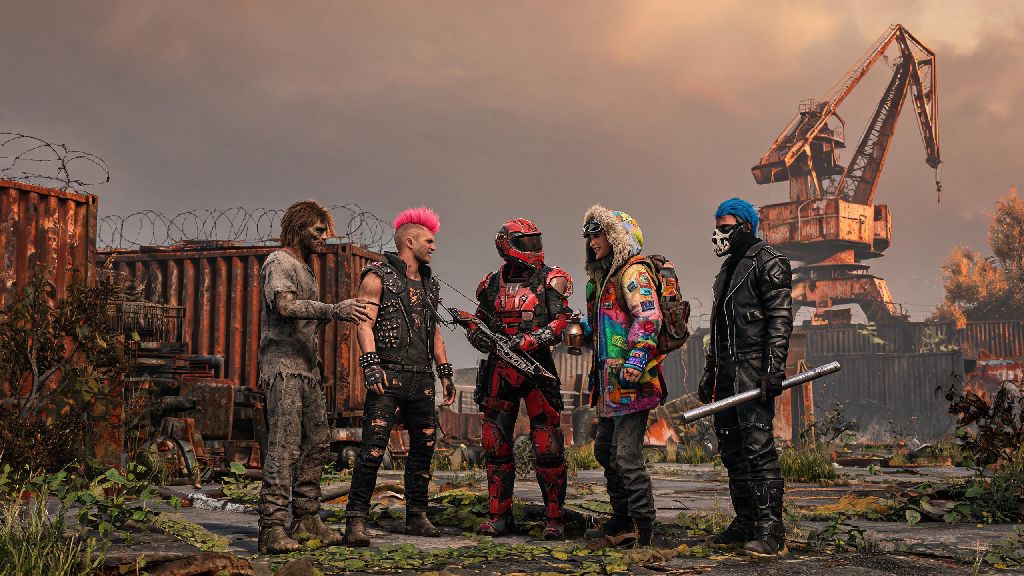
If you’ve spent even a few hours running around Rust’s harsh, post-apocalyptic landscape, you’ve probably grown tired of the default grubby survivor skin you spawn with. Maybe you want to match your crew’s matching outfit set to avoid friendly fire, or just stand out from the hundreds of other players on your server. Learning how to change your player model in Rust is one of the simplest ways to make your gameplay feel more personal, but a lot of new players run into avoidable issues like server kicks, lost skin purchases, or even permanent account bans when they don’t follow the right steps. This guide breaks down every safe, approved method to customize your character, plus all the pitfalls you need to skip.
Pre-Requisites Before You Change Your Player Model in Rust
Before you start messing with your character’s appearance, there are a few key checks you need to run first to avoid headaches later. First, make sure your Steam account is properly linked to your Rust installation, and that you don’t have any pending game updates. Outdated game files are one of the most common reasons custom skins or models fail to load, even if you followed all the steps correctly.
Never use third-party model injectors or unapproved mod tools to change your character model on official or EAC-protected servers. Easy Anti-Cheat flags these tools as cheating software, and you’ll get a permanent, non-appealable ban on your Rust account if you’re caught using them. It’s never worth the risk, even if the tool promises “undetectable” custom skins.
You also need to check the rules of the specific server you’re playing on before you make any changes. A lot of roleplay servers have strict rules about custom player models to keep immersion high: some ban overly flashy skins that don’t fit the post-apocalyptic setting, while others prohibit any model that makes you harder to spot or gives you a gameplay advantage. If you’re not sure, ask a server admin before you equip a new model.
Verify your Rust game files first if you’ve used mods on your installation before. Corrupted or modified core files can cause crashes when you try to load custom skins, and verifying files through Steam will restore any missing or changed files to their original state without deleting your saved settings or inventory items.
Official Methods to Customize Your Rust Player Model
Facepunch, the developer of Rust, has built in plenty of free and paid official customization options that are 100% safe to use on all servers, official or community-run. You don’t need any external tools to use these, and they’ll never trigger an EAC ban.
The first time you spawn into any server, you’ll see a pre-spawn customization menu that lets you adjust your base character model for free. You can change your character’s skin tone, facial features, hair style and color, and body type, all without spending any in-game or real money. These changes will stick with your character for the duration of your wipe on that server, unless you choose to re-customize when you respawn after dying.
If you want to change your visible appearance beyond the base model, you can use skins for clothing, armor, and accessories that you get from the Rust item shop, Steam Community Market, or in-game drops. When you equip a skin to a piece of gear you’re wearing, it changes how that gear looks on your player model for everyone on the server to see.
All official customization options fall into three core categories:
Official customizations are 100% EAC-compliant, so you can use them on any server without worrying about bans. The only catch is that some servers might restrict certain flashy skins on roleplay or hardcore PvP servers, so it’s still worth checking the rules first if you’re playing on a custom community server.
I usually stick to a bright orange hoodie skin on PvE servers, because it makes it super easy for my friends to spot me from far away. It’s cut down on accidental friendly fire incidents by almost 80% in my crew, which is a way bigger benefit than I expected when I bought it for $2 a few wipes back.
How to Use Modded Player Models on Community Servers
If you’re playing on a modded community server that allows custom player models, you have a lot more flexibility to change your character to almost anything you can think of. I’ve seen everything from anime characters to dinosaurs to giant walking tacos as player models on modded Rust servers, and they’re a ton of fun if you’re tired of the standard survivor look.
First, you need to make sure the server you’re joining explicitly supports custom player models. Most servers will list this feature in their server description on the server browser, so you don’t have to guess. When you join a modded server for the first time, Steam will automatically download all the required mod files for you, including any custom model assets the server uses. You don’t have to manually install anything, just wait for the download to finish before you spawn in.
Some servers let you upload your own custom player models to use, but you have to follow their specific guidelines to get approved. Most servers ban NSFW models, models that are too small or transparent (which give you an unfair hiding advantage), and models that have bright flashing lights that can trigger seizures for other players. You’ll usually have to submit your model to a server admin for review before you can use it publicly.
Always check a server's custom model rules before uploading your own to avoid getting kicked or banned. I once spent three hours making a custom dinosaur model for a roleplay server, only to get kicked immediately when I tried to use it because the server banned all non-human models to keep immersion high. It was a huge waste of time, so I always ask admins about their model rules first now.
Keep in mind that modded player models only work on the specific server you downloaded them for. They won’t carry over to official servers or other modded servers, and players not on the same server won’t be able to see your custom model. You also won’t be able to use modded models if you have EAC enabled for official servers, so you’ll have to switch to EAC-disabled mode to join modded servers that allow custom models.
Common Mistakes to Avoid When Changing Your Rust Player Model
Even though changing your player model is pretty straightforward, a lot of new players make the same avoidable mistakes that cost them time, money, or even their entire Rust account. These are the most common ones I’ve seen over the years of playing Rust.
First, never buy Rust skins from untrusted third-party sites outside of the official Steam Community Market or Rust item shop. A lot of these sites sell stolen skins that get revoked by Steam after you buy them, or are straight up scams that steal your Steam account credentials. It’s always worth paying a little extra to buy from official sources to avoid getting scammed.
Avoid any tool that asks you to modify your core Rust game files to install custom models. Any change to your core game files will trigger Easy Anti-Cheat, and you’ll get banned from all official EAC-protected servers. Even if the tool says it’s only for modded servers, modifying core files can cause permanent issues with your game installation that require a full re-install to fix.
Another common mistake is using player models that give you an unfair gameplay advantage, even on community servers. Models that are smaller than the standard survivor model make you harder to hit, models that match the terrain make you harder to spot, and models that block other players’ views are all banned on almost every server. Even if you think it’s funny, you’ll almost certainly get reported and banned by admins.
You don't need to pay to change your base player model. A lot of new players think they have to buy skins to customize their character, but the pre-spawn base model customization menu is completely free for all players, and you can adjust it every time you respawn. You only need to spend money if you want to use custom clothing skins or rare cosmetic items.
If your new player model doesn’t load after you equip it, don’t panic. Most of the time, it’s just a missing mod file or a temporary server glitch. Try leaving the server and rejoining to let Steam re-download any missing assets, or respawn your character to refresh the model load. If it still doesn’t work, reach out to the server admin for help, it’s usually a quick fix on their end.
Changing up your character’s look is one of the small, fun touches that makes Rust feel more personal, especially if you play with a regular group of friends. Learning how to change your player model in Rust safely means you can skip the common pitfalls of bans, scams, and wasted time, and get back to looting, building, and fighting with a character that feels like yours. If you’re new to the game, start with the free official customization options first to get a feel for what you like, then experiment with modded models once you’re familiar with how server rules work. At the end of the day, as long as you follow EAC rules and server guidelines, you can make your survivor look however you want.